
● Beta Access
Welcome, tester. Thank you for helping.
Already have your access code? Open the app ↓
● Your beta welcome
Hey Friend! You're one of the first.
Thank you for saying yes. You're one of a small group of beta testers, and I need you.
What happens next.
- Open the app with your code below.
- Tell your story: 2 to 3 minutes. Answer a few quick questions about who you help, what you provide and how you sound. This is what makes every post written for your content, your voice and your audience.
- Create your first post. Type what you want to talk about and get a ready-to-film script, caption and hashtags.
Who it's for.
Say It & Sell It is built for complete beginners, especially my fellow GenXers, the audience nobody's talking to. Anyone at any age can use it.
Don't let the name fool ya. "Sell It" doesn't mean you have to sell anything. Maybe you just have tips you want to share, a hobby you love, or know-how people keep asking you about. You're welcome here too. My job is to be the bridge between what you know and the people who need it.
Why I built it.
Everybody's making apps to edit your videos and telling you to get online and sell. But nobody tells you what to actually say once you get there. This app gives you the basics and helps you create content, so you're not starting from zero. I'll leave the editing apps to everybody else. 😉
What's inside the app.
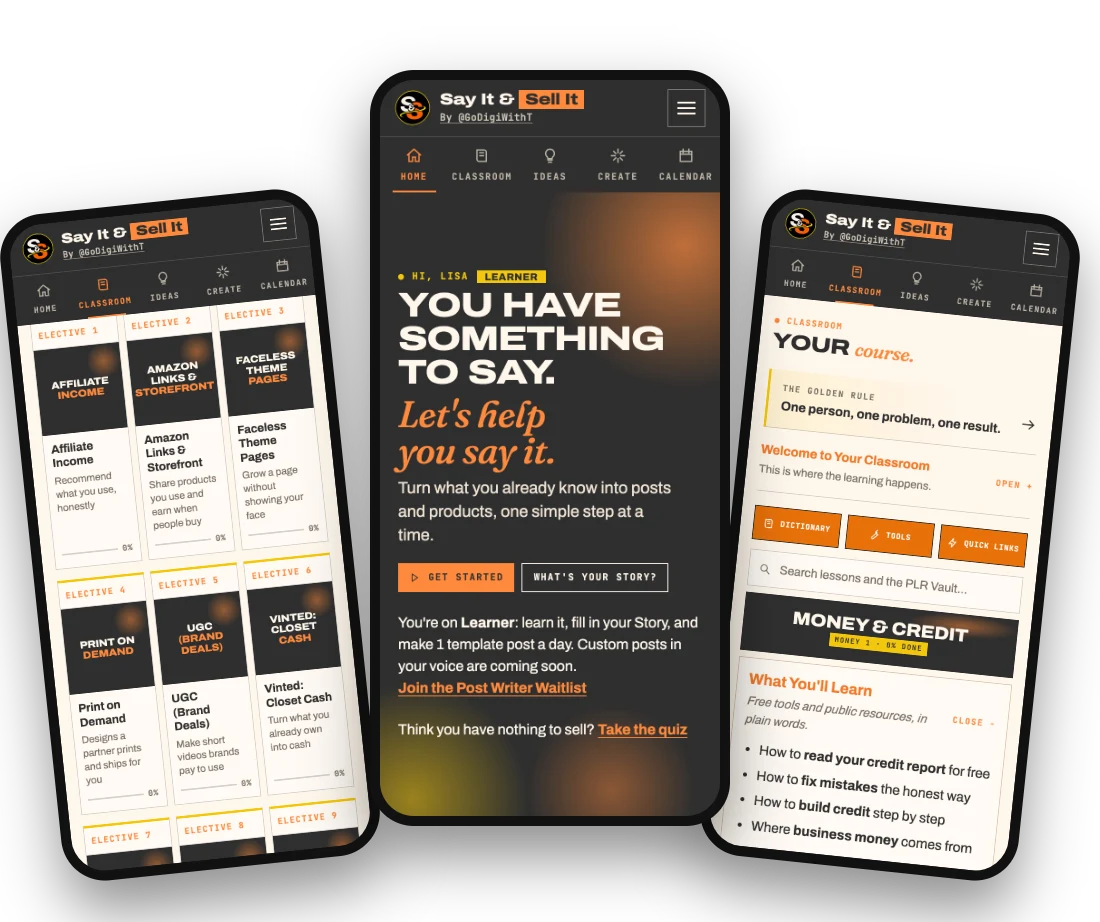
The details nobody else gives you, all in one place. It's a browser-based app: use it on your phone or desktop, with nothing to download.
Word-for-word posts
Scripts, text overlays, captions and hashtags, plus filming cues, sounds, pop-ups and timing.
Every platform, its own way
TikTok, Instagram, Facebook, YouTube Shorts, Pinterest, Threads and LinkedIn, each written the way that platform likes.
Post styles
Yap sessions, quiet text stories, "This, not that," ranked lists and more, with a guide to pick the right one.
Built-in teleprompter
Read your script while you film, from the same phone.
Sounds like you
It learns how you talk from your own words and every edit you make, so your posts never sound like a robot.
Make your product with AI
Step-by-step AI prompts, filled in with your details, to create your own digital product.
Content calendar
A 30-day content calendar with starter plans (including a camera-shy start and 21 days on LinkedIn), day, week and month views, a filming list, backups, and a spreadsheet export for Canva Bulk create.
Ideas when you're stuck
Post ideas built from your story, plus your Fab Five creators to learn from, and you can borrow a creator\'s style while you find your own voice.
Profiles
One story, more than one audience, like your personal TikTok and your LinkedIn, each with its own calendar.
A step-by-step course
The Classroom: Homeroom, 8 Periods and 6 Electives in order, from knowing what to sell to your first sales. Plus a Dictionary of 190+ terms in plain English, Ways to Earn Online, a Price Finder, DM scripts and a Bio Builder.
Made for the camera-shy
A camera-shy start plan: text only, then your voice, then part of you, then a full yap, one step a week.
Post it again
Got a post that did well? Repost it with 5 fresh hooks and a new caption, made for Instagram Trial Reels.
What you get for helping.
- Full AI posts written fresh for you, in your words, every day. The app shows how many you have left.
- The Free Guides shelf: Canva Basics, Beacons Store Setup, DM Templates, the Resource Guide, the Beginner's Roadmap, the 4-Prompt Guide and Going LIVE.
- Every full-access feature: the spreadsheet download for batching in Canva, the "Everything" view with filming cues and tips, and Profiles (one story, more than one audience, each with its own calendar).
Tap a book to take a peek.
Full AI vs. regular posts.
A quick note for when you're inside the app. Here's what to look for:
- "✨ Every post is written fresh for your people" at the top of Create. When you see it, you're signed in and every post is written fresh from your story, in your words.
- To sign in, use your email and your app code. Without signing in, the app still works, but posts come from the less customized writer.
- Your daily count. Right next to it you'll see how many full AI posts you have left today (it resets every day).
- Regular posts are unlimited and use post formulas based on what's working for successful creators, just less personal. They come from the app's less customized writer when you're not signed in or you've used today's allocation.
Why it matters: each full AI post costs real money to make. Notice how many you actually use in a day. That helps me set fair pricing.
Your feedback builds this.
It's made for complete newbies. If anything feels too complicated, or something's missing, tell me. No comment is too small. One person says it, I make a note. Two people, it gets looked at. Three or more, it's probably changing.
Your notes will also become the FAQ, troubleshooting guide and owner's manual. Send them anytime: in the app, tap ☰ Menu, then Help & feedback.
You've been there... Now let's sell that.
Tanya | @GoDigiWithT 💋
Have a code? Open the app.
Type your name, email and the access code you were given. You'll go straight into the app with full access.
No code? Join the list to hear when spots open. Need to join the beta tester list? Click here. (Your main social account needs to be public. For security, I only approve real, public accounts, not bots.) Lost your code? Get it resent.
Check your application status.
Applied to be a beta tester? Type your first name and the email you applied with.
| Name | Status | What's next |
|---|---|---|